
A stream in a forest (Source: Pexels).
Overview Link to heading
Java Streams were introduced in Java 8 and are a very powerful concept. They provide a set of functions that you can perform on certain data structures. They allow you to quickly and conveniently perform operations on them. Streams themselves are not data structures and they do not modify the underlying data structures they are operating on.
Streams do all the heavy lifting for you.
-> They “streamline” the process for you.
⚠️ Note: this article is about java.util.stream. Do not confuse it with input and output streams (java.io). That’s a totally different concept!
How to work with streams Link to heading
- Open the stream with the method
.stream(). - Chain as many operations as you like.
- Convert the stream back into a list (if necessary).
The following example filters out all people that are younger than 10 and return them as a list:
List<Person> people = new ArrayList<>();

people.stream()
    .filter(person -> person.age > 10)
    .collect(Collectors.toList())
Basically, there are two types of operations when working with streams -> intermediate and terminal operations.
-
Intermediate operations return a stream again (e.g., the methods
.filter()or.map()). -
Terminal operations process the stream to perform functions on the individual elements (e.g., to return a specific value). After that, the stream is closed, and no further operations can be performed on it until a new stream is opened (e.g., the methods
.collect()or.forEach()).
On the website “GeeksForGeeks”, I found a very nice image, explaining that concept:
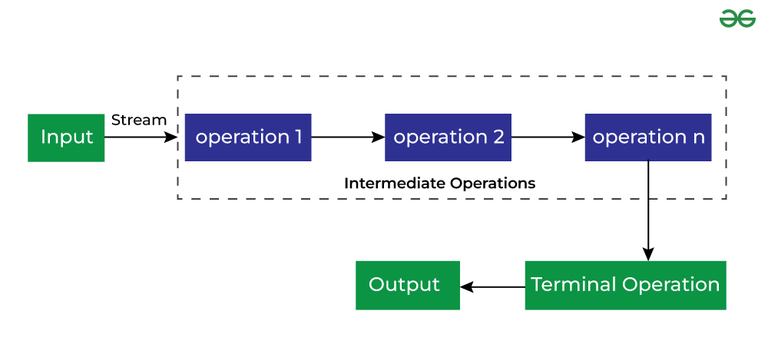
Intermediate Operations are the types of operations in which multiple methods are chained in a row. Source: (geeksforgeeks.org)
Advantages of using stream api Link to heading
When working with data, an important rule is: “Don’t change the existing value (= original data)! Instead, create a new variable with the changed data!” This is a concept that streams embrace. When working with streams, you are not working with the existing list. If you change the values of the stream, it will not affect the original data.
This also means: Once you consume the stream, you cannot reuse it:
The following code works:
List<Integer> nums = Arrays.asList(1, 2, 3, 4, 5);
Stream<Integer> data = nums.stream();
data.forEach(n -> System.out.println(n)) // closes stream (.forEach() is a terminal operation)
The following code throws an exception:
List<Integer> nums = Arrays.asList(1, 2, 3, 4, 5);
Stream<Integer> data = nums.stream();
data.forEach(n -> System.out.println(n)) // closes stream
data.forEach(n -> System.out.println(n)) // Exception: "Stream has already been operated upon or closed".
Another advantage: intermediate stream methods return a new stream so you can chain (as many operations as you want) together. This reminds me in some kind of way on the builder pattern.
Examples Link to heading
The following code sorts the array, multiplies every number with 2 and prints them to the console:
List<Integer> nums = Arrays.asList(5, 3, 1, 2, 4);

nums.stream()
    .sorted()
    .map(n -> n*2)
    .forEach(n -> System.out.println(n));
    // Output: 2, 4, 6, 8, 10
stream() vs. parallelStream() Link to heading
When working with streams you can also use the method .parallelStream() instead of .stream(). What is the difference?
As the name suggests, .parallelStream() will do the operations in parallel. It will use multiple threads to do this.
Sometimes your values are dependent on the earlier operation. In that case: don’t use parallel streams.
Note: numbers.parallelStream() is the shorthand for numbers.stream().parallel(). Essentially, it does the same.
Performance Link to heading
In this article of the magazine ‘Entwickler.de’, the performance of sequential and parallel streams has been tested and compared with the performance of regular for-loops. The finding of this article is that sequential streams are slower than for-loops, and parallel streams can indeed be faster than for-loops. Whether they are actually faster depends on the circumstances. As a rule of thumb: parallel streams are faster than sequential streams and even faster than for-loops, in case
- the sequence is large and
- processing the elements is CPU-intensive and
- the stream operation is stateless.
Whether the rule of thumb applies in a specific context can only be determined through benchmarking. Measure, don’t guess!"
List of most important stream api methods Link to heading
sorted() Link to heading
sorted() is an intermediate operation!
It sorts your stream:
List<String> names1 = List.of("Charlie", "Alice", "David", "Bob");

List<String> sortedNames =
    names1.stream()
    .sorted()
    .collect(Collectors.toList());
    // sorted alphabetically
List<Integer> numbers = List.of(5, 3, 8, 1, 4);

List<Integer> sortedNumbers =
    numbers.stream()
    .sorted()
    .collect(Collectors.toList());
    // sorted ascending
map() Link to heading
map() is an intermediate operation!
It performs a certain operation on each item:
        List<Integer> numbers = List.of(1, 2, 3, 4, 5);

        List<Integer> multipliedNumbers =
            numbers.stream()
            .map(n -> n*2)
            .collect(Collectors.toList());
            // Output: [2, 4, 6, 8, 10]
mapToInt() Link to heading
mapToInt() is an intermediate operation!
It is used to transform elements of a stream into an IntStream, which is a specialized stream for handling primitive int values. It applies a mapping function to each element of the stream and converts the result into an int. This is particularly useful for performing numerical operations, like summing, averaging, or counting, without the overhead of boxing and unboxing to Integer.
Example 1: Convert a list of objects to their integer property
Let’s say you have a list of strings, and you want to map them to their lengths.
List<String> words = Arrays.asList("apple", "banana", "cherry", "date");

// Convert the list to a stream and map each string to its length
int stringLengths =
    words.stream()
    .mapToInt(String::length); // Map to the length of each string
    // Output: [5, 6, 6, 4]
Example 2: Mapping object properties to int
Consider a list of objects where you want to map to a specific integer field, like age from a list of Person objects.
import java.util.Arrays;
import java.util.List;

public class MapToIntPersonExample {
    public static void main(String[] args) {
        // Create a list of people
        List<Person> people = Arrays.asList(
            new Person("John", 25),
            new Person("Jane", 30),
            new Person("Tom", 35)
        );

        // Map each person to their age
        people.stream()
            .mapToInt(Person::getAge)
            // Output: [25, 30, 35]
    }
}

// Simple Person class with name and age
class Person {
    private String name;
    private int age;

    public Person(String name, int age) {
        this.name = name;
        this.age = age;
    }

    public int getAge() {
        return age;
    }
}
Example 3: Summing values using mapToInt()
    // Create a list of integers
    List<Integer> numbers = Arrays.asList(1, 2, 3, 4, 5);

    // Use mapToInt to convert Integer to int and calculate the sum
    int sum = numbers.stream()
        .mapToInt(Integer::intValue) // Unbox Integer to int
        .sum();

    System.out.println("Sum of numbers: " + sum);
    // Output: "Sum of numbers: 15"
flatMap() Link to heading
flatMap() is an intermediate operation!
It is used to transform each element of a stream into another stream and then flatten those streams into a single stream. It is particularly useful when dealing with collections of collections, such as a list of lists, and you want to create a single unified stream of elements.
List<List<Integer>> listOfLists =
    Arrays.asList(
        Arrays.asList(1, 2, 3),
        Arrays.asList(4, 5),
        Arrays.asList(6, 7, 8, 9)
    );

List<Integer> allNumbers = listOfLists.stream()
    .flatMap(list -> list.stream())
    .collect(Collectors.toList());
    // Output: [1, 2, 3, 4, 5, 6, 7, 8, 9]
In simple terms, flatMap allows you to:
- Transform: Convert each element of a stream into another stream.
- Flatten: Merge all those generated streams into a single continuous stream.
limit() Link to heading
limit() is an intermediate operation!
It restricts the number of elements in a stream to a specified number:
List<Integer> numbers = List.of(1, 2, 3, 4, 5);

List<Integer> firstThreeNumbers = numbers.stream()
    .limit(3)  // Limit the stream to the first 3 elements
    .collect(Collectors.toList());  // Output: 1, 2, 3
distinct() Link to heading
distinct() is an intermediate operation!
It removes duplicate elements from a stream and retain only unique elements:
List<Integer> numbers = List.of(1, 2, 3, 2, 4, 5, 1, 6, 4);

List<Integer> uniqueNumbers = numbers.stream()
    .distinct()
    .collect(Collectors.toList());
    // Output: [1, 2, 3, 4, 5, 6]
skip() Link to heading
skip() is an intermediate operation!
It skips a specified number of elements at the beginning of a stream:
List<Integer> numbers = List.of(1, 2, 3, 4, 5, 6, 7, 8, 9, 10);

List<Integer> result = numbers.stream()
    .skip(3)
    .collect(Collectors.toList());
    // Output: [4, 5, 6, 7, 8, 9, 10]
peek() Link to heading
peek() is an intermediate operation!
It is used to apply an operation to each element of a stream without modifying the stream itself. It is especially useful for debugging or logging, allowing you to inspect the state of elements during stream processing.
This method exists mainly to support debugging, where you want to see the elements as they flow past a certain point in a pipeline. Since Java 9, if the number of elements is known in advance and unchanged in the stream, the .peek() statement will not be executed due to performance optimization. Using peek() without any terminal operation does nothing.
 List<Integer> numbers = List.of(1, 2, 3, 4, 5);

// Create a stream, apply the peek operator to each element, and collect the processed elements
List<Integer> result = numbers.stream()
    .peek(n -> System.out.println("Processing: " + n))
    .map(n -> n * 2)
    .peek(n -> System.out.println("Doubled: " + n))
    .collect(Collectors.toList());
Output:
Processing: 1
Doubled: 2
Processing: 2
Doubled: 4
Processing: 3
Doubled: 6
Processing: 4
Doubled: 8
Processing: 5
Doubled: 10

Result List: [2, 4, 6, 8, 10]
boxed() Link to heading
boxed() is an intermediate operation!
The method boxed() is designed only for streams of some primitive types (IntStream, DoubleStream, and LongStream) to box each primitive value of the stream into the corresponding wrapper class (Integer, Double, and Long respectively).
This throws an Exception:
IntStream.of(1, 2, 3, 4, 5)
.collect(Collectors.toList()); // Compilation Error!
This works:
IntStream.of(1, 2, 3, 4, 5)
.boxed()
.collect(Collectors.toList());
filter() Link to heading
filter() is an intermediate operation!
It filters out items based on a given criteria:
List<Integer> numbers = List.of(1, 2, 3, 4, 5);

List<Integer> filteredNumbers = numbers.stream()
    .filter(n  ->  n > 3)
    .collect(Collectors.toList());
    // Output: [4, 5]
Creating the filter predicate with an anonymous inner class:
Predicate<Integer> predi = (Integer n) -> {
	return n > 3;
}

List<Integer> filteredNumbers = numbers.stream()
    .filter(predi)
    .collect(Collectors.toList());
iterate() Link to heading
iterate() is an intermediate operation!
It allows you to create an infinite stream by repeatedly applying a function to generate the next element. The method takes an initial seed value and a unary operator (a function that takes one argument and produces a result) to generate the next value in the sequence.
// Generate an infinite stream of even numbers starting from 0
Stream.iterate(0, n -> n + 2)
    .limit(5) // Limit the stream to 5 elements
    .forEach(System.out::println);
// Output: [0, 2, 4, 6, 8]
More detailed examples and explanations to the iterate() functions can be found in a medium blog article of “Neesri”.
unordered() Link to heading
unordered() is an intermediate operation!
It is used to indicate that the stream’s order does not matter, potentially enabling performance optimizations for certain operations. This can be particularly useful when dealing with parallel streams, where maintaining order can be costly. By calling unordered(), you signal to the Stream API that the ordering of elements is not important. This allows the implementation to use optimizations that might improve performance. In the context of parallel streams, maintaining order can be expensive due to the need for synchronization and merging of results. Marking a stream as unordered can reduce these overheads.
Example:
List<Integer> numbers = Arrays.asList(1, 2, 3, 4, 5, 6, 7, 8, 9, 10);

numbers.parallelStream()
    .unordered() // Indicate that the order does not matter
    .filter(n -> n % 2 == 0) // Filter even numbers
    .forEach(System.out::println); // Print each even number
Since it’s parallel, the exact order of numbers may vary each time you run the code. The output could be any permutation of the even numbers:
Possible output 1: [6, 2, 8, 10, 4] Possible output 2: [4, 6, 2, 10, 8]
count() Link to heading
count() is a terminal operation!
It gives you the size of the stream:
List<String> names = List.of("Alice", "Bob", "Charlie", "David");

long count = names.stream().count(); // 4
sum() Link to heading
sum() is a terminal operation!
It is used to calculate the sum of elements in a stream. This function is available in the primitive streams like IntStream, LongStream, and DoubleStream. The sum() method returns the sum of the elements as a primitive value (int, long, or double depending on the stream type).
List<Integer> numbers = Arrays.asList(1, 2, 3, 4, 5);

// Use mapToInt to convert List<Integer> to IntStream and then sum all the numbers
int sum = numbers.stream()
    .mapToInt(Integer::intValue) // Convert Integer to int
    .sum(); // Sum all the int values
// Output: 15
allMatch() Link to heading
allMatch() is a terminal operation!
It checks if all elements in a stream match a given predicate. The method returns a boolean value:
- true if all elements satisfy the provided predicate.
- false if at least one element does not satisfy the predicate.
List<Integer> numbers = Arrays.asList(3, 7, 10, 15, 2);

// Check if all numbers in the list are positive
boolean allPositive = numbers.stream()
    .allMatch(num -> num > 0); // Predicate: Check if all numbers are positive
This output is true because all the numbers in the list are positive. If any number in the list would be negative or zero, the result would be false.
anyMatch() Link to heading
anyMatch() is a terminal operation!
It checks if at least one element in the stream matches a given predicate. It returns a boolean value:
- true if at least one element in the stream satisfies the provided predicate.
- false if no elements match the predicate.
List<Integer> numbers = Arrays.asList(3, 7, 10, 15, 2);

// Check if any number in the list is greater than 10
boolean anyGreaterThanTen = numbers.stream()
    .anyMatch(num -> num > 10); // Predicate: Check if any number is greater than 10
This output is true because there is at least one number (15) in the list that is greater than 10.
noneMatch() Link to heading
noneMatch() is a terminal operation!
It checks if no elements in the stream match a given predicate. It returns a boolean value:
- true if no elements in the stream satisfy the provided predicate.
- false if at least one element matches the predicate.
List<Integer> numbers = Arrays.asList(1, 2, 3, 4, 5);

// Check if none of the numbers in the list are negative
boolean noneNegative = numbers.stream()
    .noneMatch(num -> num < 0); // Predicate: Check if each number is negative
This output is true because none of the numbers in the list is negative.
findFirst() Link to heading
findFirst() is a terminal operation!
It is used to find the first element of a stream. It returns an Optional that may contain the first element, or be empty if the stream has no elements.
List<Integer> numbers = Arrays.asList(10, 20, 30, 40, 50);

Optional<Integer> firstNumber = numbers.stream().findFirst();

if (firstNumber.isPresent()) {
    System.out.println("First number in the list: " + firstNumber.get());
} else {
    System.out.println("List is empty.");
}
// prints "First number in the list: 10"
findAny() Link to heading
findAny() is a terminal operation!
It is similar to findFirst(), but it may return any element from the stream. It also returns an Optional.
The findAny() method allows you to find any element from a Stream. You can use it when you are looking for an element without paying attention to the encounter order. It is particularly useful in parallel streams where non-deterministic behavior can occur.
List<Integer> numbers = Arrays.asList(10, 20, 30, 40, 50);

Optional<Integer> anyNumber = numbers.stream().findAny();

if (anyNumber.isPresent()) {
    System.out.println("Found a number: " + anyNumber.get());
    // prints any number of the stream. "Found a number: 10"
}
max() Link to heading
max() is a terminal operation!
It finds the maximum element in a stream based on a given comparator. It returns an Optional containing the maximum element if the stream is not empty.
 List<Integer> numbers = Arrays.asList(10, 40, 30, 50, 20);

Optional<Integer> maxNumber = numbers.stream()
    .max(Comparator.naturalOrder());

if (maxNumber.isPresent()) {
    System.out.println("Maximum number in the list: " + maxNumber.get());
    // prints: "Maximum number in the list: 50"
}
Many comparators exist that can be used here. Two examples are the following. But there are many more:
Comparator.naturalOrder()-> ascendingComparator.reverseOrder()-> descending
min() Link to heading
min() is a terminal operation!
It is used to find the minimum element in a stream based on a comparator. It returns an Optional containing the minimum element if the stream is not empty.
List<Integer> numbers = Arrays.asList(40, 10, 30, 50, 20);

Optional<Integer> minNumber = numbers.stream().min(Comparator.naturalOrder());

if (minNumber.isPresent()) {
    System.out.println("Minimum number in the list: " + minNumber.get());
    // prints: "Minimum number in the list: 10"
}
toArray() Link to heading
toArray() is a terminal operation!
It converts the elements of a stream into an array. There are two common variants of this method:
-
toArray(): Converts the stream to an array of Object[]. Can be useful when you’re working with objects and don’t need to specify the array type. -
toArray(IntFunction<A[]> generator): Allows you to create an array of a specific type, e.g., String[], Integer[], etc. The IntFunction generates the array with the correct size. For example, Integer[]::new creates an Integer[] array of the appropriate size.
Example 1:
List<Integer> numbers = Arrays.asList(1, 2, 3, 4, 5);

// Convert the stream to an Object[] array
Object[] numberArray = numbers.stream().toArray();
Example 2:
List<Integer> numbers = Arrays.asList(1, 2, 3, 4, 5);

// Convert the stream to an Integer[] array
Integer[] numberArray = numbers.stream().toArray(Integer[]::new);
collect() Link to heading
collect() is a terminal operation!
It transforms the elements of a stream into a different form, typically a collection like a List, Set, or Map, or even a custom result, such as a concatenated string or a summary object. It’s a flexible and powerful way to accumulate the results of a stream processing pipeline.
.collect(Collectors.toList()) will return a new list for example.
Example:
List<String> list = Stream.of("apple", "banana", "cherry")
    .collect(Collectors.toList());
Java provides several predefined collectors in the Collectors utility class. Here are some common ones:
toList(): Collects elements into a List.toSet(): Collects elements into a Set.toMap(): Collects elements into a Map.joining(): Concatenates the elements of a stream into a single String.groupingBy(): Groups the elements by a classifier function.partitioningBy(): Partitions the elements into two groups based on a predicate.
List<String> words = Arrays.asList("apple", "banana", "cherry");

String result = words.stream()
    .collect(Collectors.joining());

System.out.println(result);
// Output: applebananacherry
List<String> names = Arrays.asList("apple", "banana", "cherry", "apricot", "blueberry");

Map<Integer, List<String>> groupedByLength = names.stream()
    .collect(Collectors.groupingBy(String::length));

System.out.println(groupedByLength);
// Output: {5=[apple], 6=[banana, cherry], 7=[apricot], 9=[blueberry]}
List<Integer> numbers = Arrays.asList(1, 2, 3, 6, 7, 8);

Map<Boolean, List<Integer>> partitioned = numbers.stream()
    .collect(Collectors.partitioningBy(n -> n > 5));

System.out.println(partitioned);
// Output: {false=[1, 2, 3], true=[6, 7, 8]}
reduce() Link to heading
reduce() is a terminal operation!
It is used to combine all the elements of a stream into a single result. It applies a binary operator to the elements of the stream, accumulating them into a single value. This method is particularly useful for performing aggregations or reductions on a collection of data.
List<Integer> numbers = Arrays.asList(1, 2, 3, 4, 5);

int sum = numbers.stream()
    .reduce(0, Integer::sum);

System.out.println(sum);  // Output: 15
generate() Link to heading
generate() is a static factory method! (used to create streams; not an operation on streams themselves)
It creates an infinite sequential stream where each element is generated by a Supplier. It’s often used when you need to create streams with repeated or dynamically generated values.
Since generate() produces an infinite stream, it’s typically paired with methods like limit() to create a finite number of elements.
Example 1: Using Stream.generate() to create a finite stream of random numbers
// Create a stream of 3 random numbers
Stream<Double> randomNumbers = Stream.generate(Math::random).limit(3);
// [0.2493885034549821, 0.7938434107875401, 0.2372843984052291]
Example 2: Generate a sequence of fixed values
// Generate a stream of 3 "Hello" strings
Stream<String> helloStream = Stream.generate(() -> "Hello").limit(3);
// ["Hello", "Hello", "Hello"]
Example 3: Generate a stream of sequential numbers
import java.util.stream.Stream;

public class SequentialNumbersExample {
    public static void main(String[] args) {
        // Generate a stream of 5 sequential numbers starting from 1
        Stream<Integer> numberStream = Stream.generate(new Counter()).limit(5);

        numberStream.forEach(System.out::println);
        // [1, 2, 3, 4, 5]
    }
}

// Custom Supplier that generates sequential numbers
class Counter implements java.util.function.Supplier<Integer> {
    private int current = 0;

    @Override
    public Integer get() {
        return ++current;
    }
}
range() Link to heading
range() is a static factory method! (used to create streams; not an operation on streams themselves)
It is used to generate a stream of numbers within a specific range. This function is particularly useful for working with sequences of integers or long values in a concise and efficient way. There are two variants of the range() function, one for IntStream and one for LongStream. Both work similarly but operate on different types of numbers (int and long).
IntStream.range(1, 5)
    .forEach(System.out::println);
// Output: [1, 2, 3, 4]
LongStream.range(1L, 5L)
    .forEach(System.out::println);
// Output: [1, 2, 3, 4]
IntStream.rangeClosed(1, 5)
    .forEach(System.out::println);
// Output: [1, 2, 3, 4, 5]
Reference Link to heading
Videos Link to heading
-
Video from “Keep On Coding”: Java Streams Tutorial, URL: https://www.youtube.com/watch?v=FWoYpM-E3EQ&t=25s, Last Access: 13th September 2024.
-
Video from “Navin Reddy”: Stream API in Java, URL: https://www.youtube.com/watch?v=tklkyVa7KZo, Last Access: 13th September 2024.
-
Video from “Franz Bernack”: Java Streams erklärt, URL: https://www.youtube.com/watch?v=E-8qMRqRQ_A, Last Access: 13th September 2024.
-
Video from “Interview DOT”: Java 8 Streams Boxed() Example | Why Do We Need Java 8 Boxed() API | Example Code | InterviewDOT, URL: https://www.youtube.com/watch?v=Nz6TdVivRVA&t=38s, Last Access: 13th September 2024.
Articles Link to heading
-
Angelika Langer and Klaus Kreft: Entwickler.de Article – Effective Java: Teil 12 – Java 8: Parallele Streams, Java Magazin 8.2015, Entwickler.de, Published: 1st July 2015, URL: https://entwickler.de/java/java-8-parallele-streams, Last Access: 13th September 2024.
-
Angelika Langer and Klaus Kreft: Entwickler.de Article – Effective Java: Teil 13 – Java 8: Stream Performance, Java Magazin 10.2015, Entwickler.de, Published: 2nd September 2015, URL: https://entwickler.de/java/java-8-stream-performance, Last Access: 13th September 2024.
-
Medium Blog-Article from “Neesri”: About Stream.iterate, Published: Jan 30, 2024, URL: https://neesri.medium.com/about-stream-iterate-e2984e87caea, Last Access: 13th September 2024.
Websites Link to heading
-
GeeksforGeeks-Article: Stream in Java, URL: https://www.geeksforgeeks.org/stream-in-java/, Last Access: 13th September 2024.
-
GeeksforGeeks-Article: Stream peek method in java with examples, URL: https://www.geeksforgeeks.org/stream-peek-method-in-java-with-examples/, Last Access: 13th September 2024.
-
Blog-Article from Emmanuel Ogbinaka: The Java .boxed() Method, URL: https://dev.to/imanuel/the-java-boxed-method-571n, Posted on 19. Juni 2022, Last Access: 13th September 2024.
-
Stack-Overflow Article: Why does Stream#findAny() exist?, URL: https://stackoverflow.com/questions/73235495/why-does-streamfindany-exist, Last Access: 13th September 2024.
-
Baeldung-Article: Java Stream findFirst() vs. findAny(), URL: https://www.baeldung.com/java-stream-findfirst-vs-findany, Last Access: 13th September 2024.