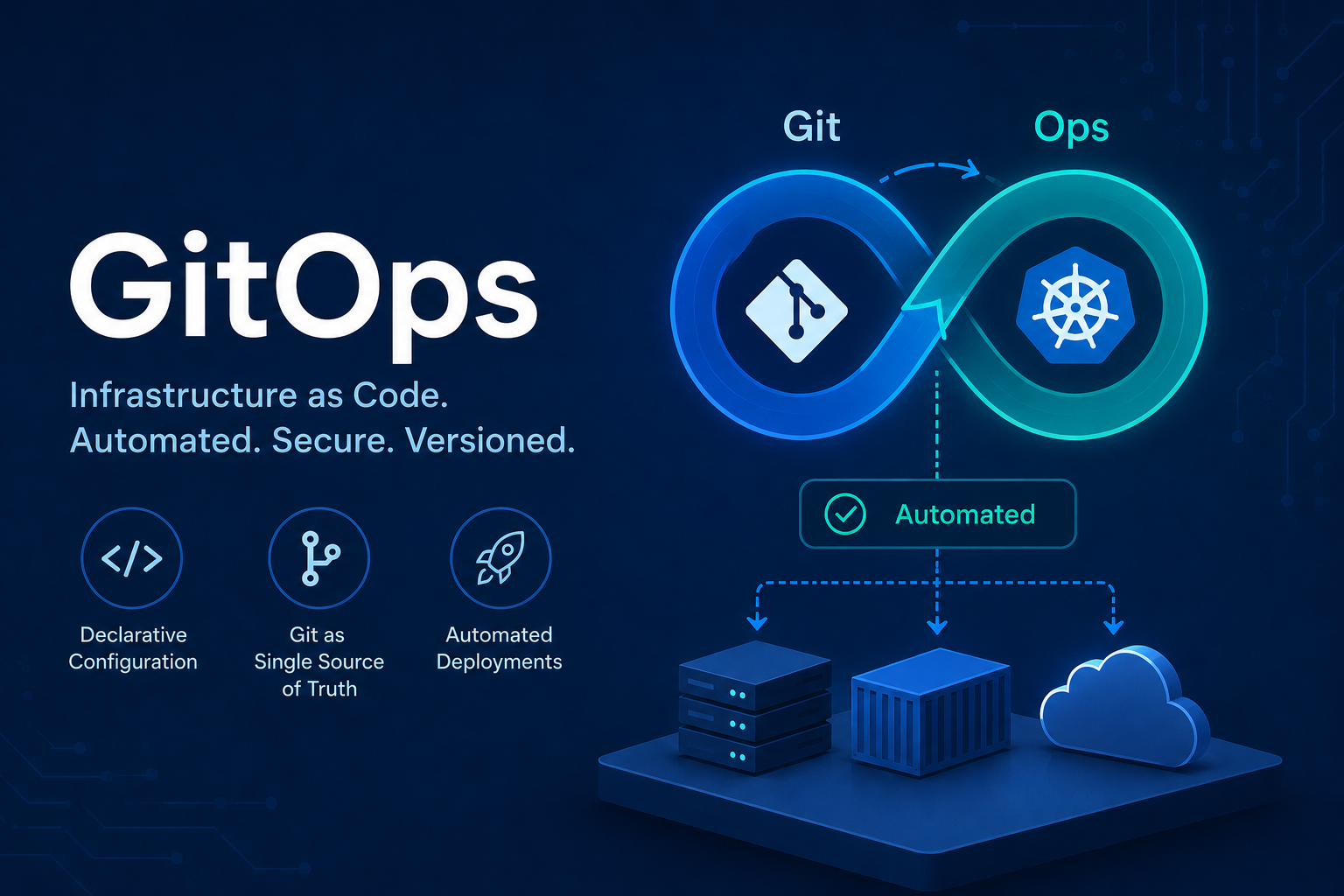
In the following article, i try to explain what GitOps is and why it is so important for modern infrastructure management.
What is the problem that GitOps solves? Link to heading
Kubernetes uses a declarative configuration approach. What does that mean?
Assume the following scenario:
Current state: I currently have 5 instances of a microservice.
Desired state: I want to have 15 instances of a microservice.
In Kubernetes, you only specify the “desired state.” You tell kubernetes that, in the end, you want 15 instances. Kubernetes then checks the current state, sees that there are currently 5 instances running, and adds 10 more instances. Everything in Kubernetes is a declarative configuration object that represents the desired state of the system. It is Kubernetes’ responsibility to ensure that the actual state of reality matches the desired state.
Kubernetes compares the desired state with the current state, determines the difference, and executes the necessary actions to achieve the desired state.
When working with Kubernetes, you typically work with declarative configuration YAML files (deployment.yaml, service.yaml, ingress.yaml, etc.). When you change something in those files, you need to apply the changes to the cluster so Kubernetes can compare the desired state defined in the YAML files with the current state of the cluster and determine what needs to be updated.
This is usually done with the command:
kubectl apply -f ./deployment.yaml
Kubernetes then reconciles the current state with the desired state by creating, updating, or removing resources as necessary.
In a typical team development workflow, developers commit, push, and review changes to Kubernetes configuration YAML files. When everything is correct, they merge it into the main branch.
Without additional automation, someone would then still need to manually run the previously mentioned kubectl apply command after every main-branch-merge in order to apply those changes to the production cluster.
This approach is both tedious and error-prone.
For example:
- What if someone accidentally breaks something while manually applying changes to production?
- What if the kubectl apply command is forgotten?
- What if the actual cluster state slowly drifts away from the configuration stored in Git?
In this setup, there is no technical guarantee that the YAML files in the Git repository exactly represent the current state of the cluster — even though ideally they should.
What we really want is:
After changes are merged into Git, the Kubernetes cluster should automatically reconcile itself to match the configuration stored in the repository.
And this is exactly where GitOps comes into play. With GitOps, the Git repository becomes the single source of truth for the desired state of the environment. When changes are merged into main, a tool like Argo CD automatically ensures that the Kubernetes configuration changes are applied and synchronized with the cluster.
Infrastructure as Code (IaC) Link to heading
The short explanation/definition of GitOps is:
“infrastructure as code” done right - with all the best practices
The “infrastructure as code” (IaC) concept is when you define your infrastructure as code instead of manually creating it. That means: Instead of manually executing commands in a terminal, the infrastructure is described in configuration files that can be versioned, reviewed, and automatically applied. An example of that would be: typing docker commands into the terminal vs. writing a docker compose yaml file.
This makes our infrastructure much easier to reproduce and replicate! Everyone on the team can immediately see, for example, exactly what changes were made.
However it’s not only about infrastructure anymore. Infrastructure as code actually evolved into defining not only “infrastructure” but also network, policy, configuration, etc. as code:
- network as code
- policy as code
- configuration as code
Some people also refer to this pattern as “X as Code”, where “X” can be replaced with different domains such as infrastructure, configuration, or policies. For example, instead of manually creating Kubernetes clusters with certain components, you define all of this in Kubernetes manifest files. And then you end up with a set of YAML files (or other definition files) that describe your infrastructure, platform, and configuration in a declarative way.
IaC done the wrong way ❌ Link to heading
Imagine you as a DevOps engineer create a Git repository for your “infrastructure as code” and store all these files centrally on Git where other team members can fetch the code as well and collaborate. So far so good! However you have the following problems:
- Team-Members are committing directly into the Main-Branch
- No Pull-Requests (Merge-Requests)
- No Code-Reviews and therefore no team-collaboration on the changes
- No automated tests
When you make any changes to the code, you may not have a defined review/approval process. You may just have a main branch and when you or your team-mates change the code, it is committed directly into the main branch. So no code reviews, no pull-requests and no collaboration on the changes. Also when you commit your infrastructure code changes into the repository, no automated tests are running to test these code changes.
Without automated tests for your “infrastructure as code”-files, you will additionally have the following possible problems:
- You committed invalid yaml files
- You committed typos in yaml files (e.g. wrong attribute name)
- Your Code-Changes will break infrastructure
- Your Code-Changes will break application environment
So how are a team member’s changes applied to the actual infrastructure/platform after the commit? Infrastructure Updates are not automated! Therefore, the team member has to do this manually by running the kubectl apply command.
To execute the code changes, each team member must access the Kubernetes cluster and apply changes there from their local machine. This arises the following problems:
- Everyone in the team needs direct access/permission to the infrastructure (e.g. kubernetes cluster).
- It is hard to trace who executed what on the remote servers
- No history of changes applied to the infrastructure is available
- If mistakes are made in the code (wrong configuration, wrong attributes, etc.) you will see these errors only after you applied them to the cluster.
So even though you have an “infrastructure as code” which already has lots of benefits, your process is still mostly manual and inefficient in this example.
GitOps to the rescue! 🦸 Link to heading
So that’s where the GitOps concept comes in to basically treat the infrastructure as code the same way as software engineers treat the application code.
So in GitOps practice, we have a separate repository for the “infrastructure as code” project and a full DevOps pipeline for it.
The GitOps Workflow Link to heading
With GitOps, “infrastructure as code” is hosted on a Git repository.
- it’s version controlled through Git!
- it allows team collaboration through code-reviews and pull-requests!
Instead of just pushing to the main branch directly, devops-engineers go through the same pull request process as software engineers do for application code. Anyone in the team can create a pull request, make changes to the code and collaborate with other team members on that pull request. For every change that’s pushed to the repository, a CI-Pipeline validates and tests the changed kubernetes-files. Other experienced team members can then approve the final changes. This way you have a tested, well-reviewed infrastructure changes before they get applied in any environment. Only after that, changes will be merged back into the main branch and through a CD-Pipeline get deployed to the environment. In this way, you have an automated process which is more transparent and produces high quality infrastructure code where multiple people collaborate on the change and things get tested rather than one engineer doing all the stuff from the laptop manually that others don’t see or can’t review.
To summarize, the GitOps-Workflow looks like the following:
-
A DevOps-Engineer creates a new branch in the repository and commits some changes on it.
-
Every push to the repository triggeres a CI-Pipeline that validates and tests the changed (e.g. kubernetes-) files.
-
After the task is finished, the devops engineer creates a pull-request (merge-request).
-
Another devops engineer does a code-review and approves the pull-request if the changes are correct.
-
After approval, the changes of the pull-request are then merged into the main-branch.
-
The merge into the main-branch triggers a CD-Pipeline, that automatically applies those changes to the infrastructure (e.g. to the kubernetes cluster).
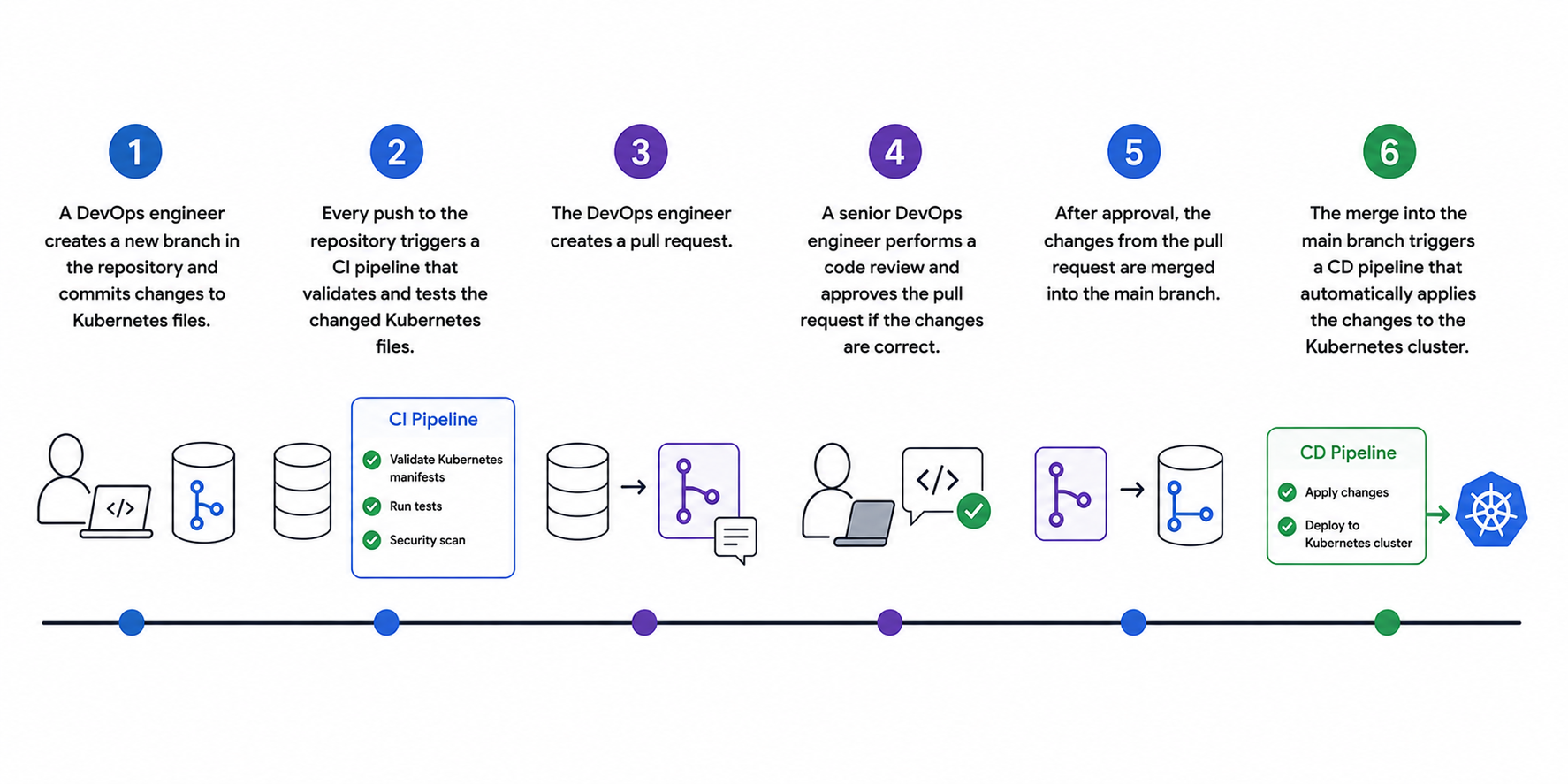
The GitOps Workflow: ‘Infrastructure as Code’ is treated the same way as ‘application code’during the development process!
CD-Pipeline: Push vs. Pull Model Link to heading
Now let’s take a deeper look into Step 6 of this GitOps-Workflow. Once merged into the main branch, the changes will be automatically applied to the infrastructure through a CD pipeline. In GitOps, there are two ways of applying those changes:
- push-based deployments
- pull-based deployments
Push-based deployments Link to heading
Push-based deployments is what we traditionally know from the application pipeline on Jenkins. For example a Java-Application is built and the pipeline executes a command to deploy the new application version into the environment. When working with kubernetes, this CD pipeline uses kubectl apply or similar tools to deploy the changes directly to the Kubernetes cluster.
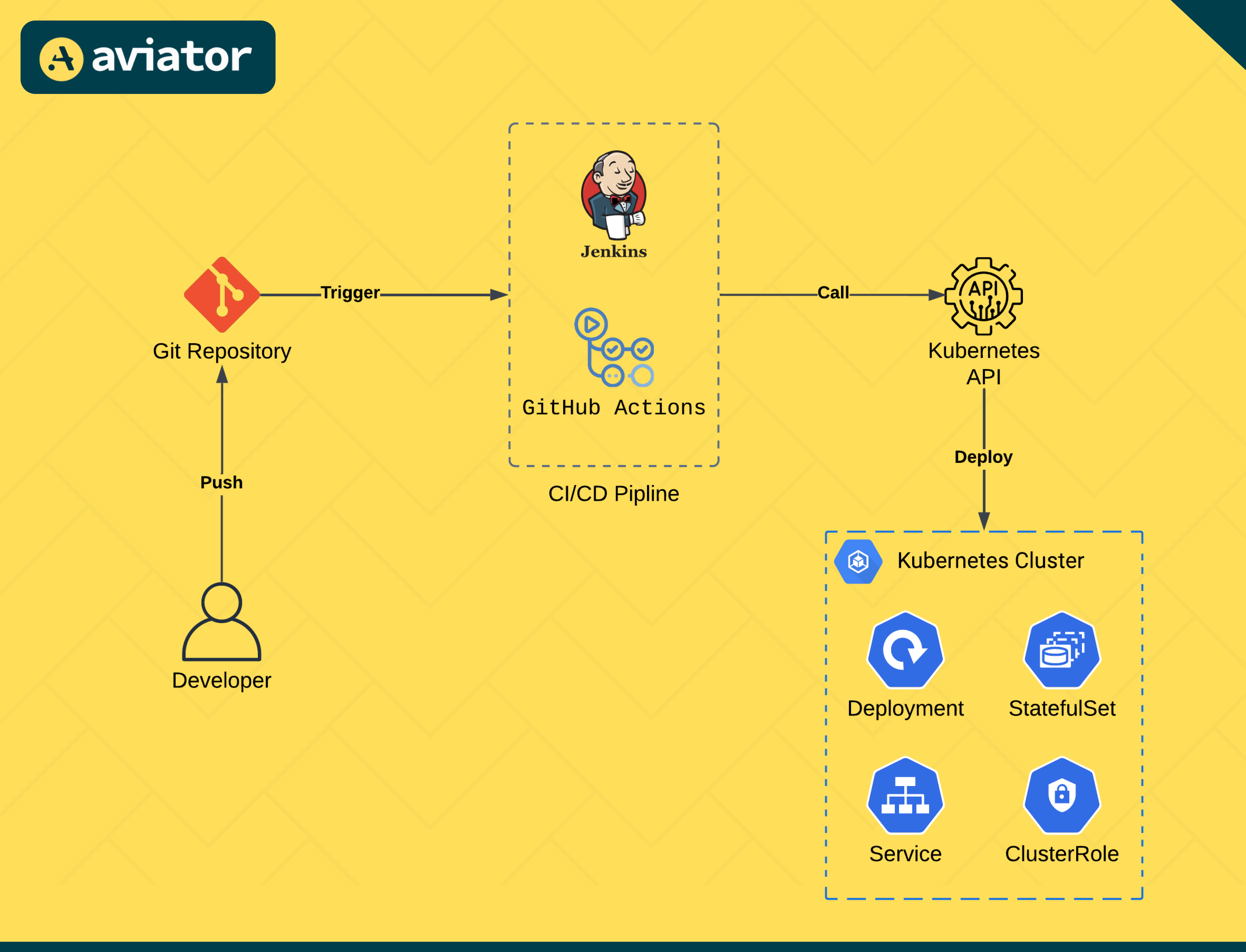
In push-based deployments, the pipeline applies the changesto the kubernetes cluster in a traditional way. Source: Aviator
Pull-based deployments Link to heading
Pull-based deployments work the other way around. Here you have an agent installed in the Kubernetes cluster, that actively pulls the changes from the Git repository itself. This agent will check regularly what is the state of the infrastructure code in the repository and compare it to the actual state in the kubernetes cluster where it’s running. If it sees there is a difference in the repository, it will pull and apply these changes to get the environment from the actual state to the desired state defined in the repository. In this way, the repository and the kubernetes cluster stays in sync everytime! Examples of GitOps tools that work with the pull-based model are Flux CD and Argo CD, which run inside the Kubernetes cluster and sync the changes from the Git repository to the cluster.
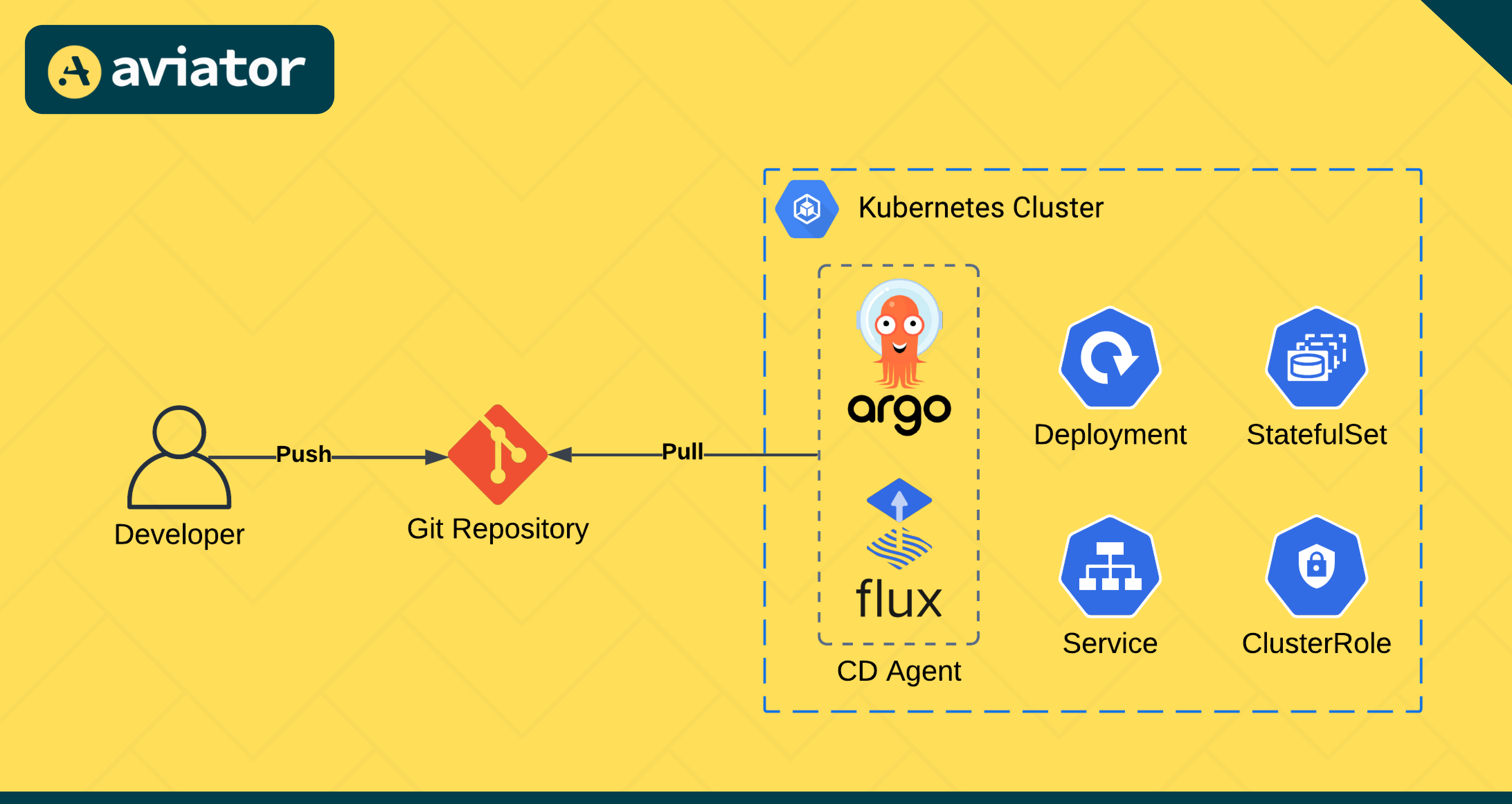
In pull-based deployments, a tool like ‘Argo CD’ syncs the changes from the Git repository automatically to the kubernetes cluster. Source: Aviator
Easy Rollback Link to heading
Another big advantage: When the changes in the repository are automatically synced to the kubernetes cluster, you can easily roll back your environment to any previous state in your code.
If you make changes that break something in the kubernetes-cluster, you can just do git revert to undo the latest changes and get the environment back to the last working state.
Git: Single Source of Truth Link to heading
Overall, this means that instead of spreading your infrastructure as code in different places and machines and basically having those files just lying around on your computer, everything is stored centrally in a git repository and the environment/cluster is always synced with what’s defined in that repository. And this means that the git repository becomes the single source of truth for your environment. And of course, this makes managing your infrastructure or your platform way easier.
Increasing Security Link to heading
Another big advantage: GitOps increases security!
With GitOps, you don’t have to give everyone in the team direct access to the kubernetes cluster to execute the changes because it’s the CD pipeline that deploys the changes, not individual team members from their laptops.
However anyone on the team can propose changes to the infrastructure in the git repository through pull requests! As a result, you have less permissions to manage and a more secure environment.
Summary Link to heading
GitOps = infrastructure as code + version control + pull requests + CI-CD pipeline
The CD pipeline automatically applies changes to the kubernetes-cluster. Tools like Argo CD can be used to synchronize the git repository with the kubernetes cluster.
I hope this article helped you understanding GitOps! 😊
Reference Link to heading
Video from “TechWorld with Nana”: What is GitOps, How GitOps works and Why it’s so useful.
https://www.youtube.com/watch?v=f5EpcWp0THw
Aviator: “Choosing Between Pull vs. Push-Based GitOps”
https://www.aviator.co/blog/choosing-between-pull-vs-push-based-gitops/